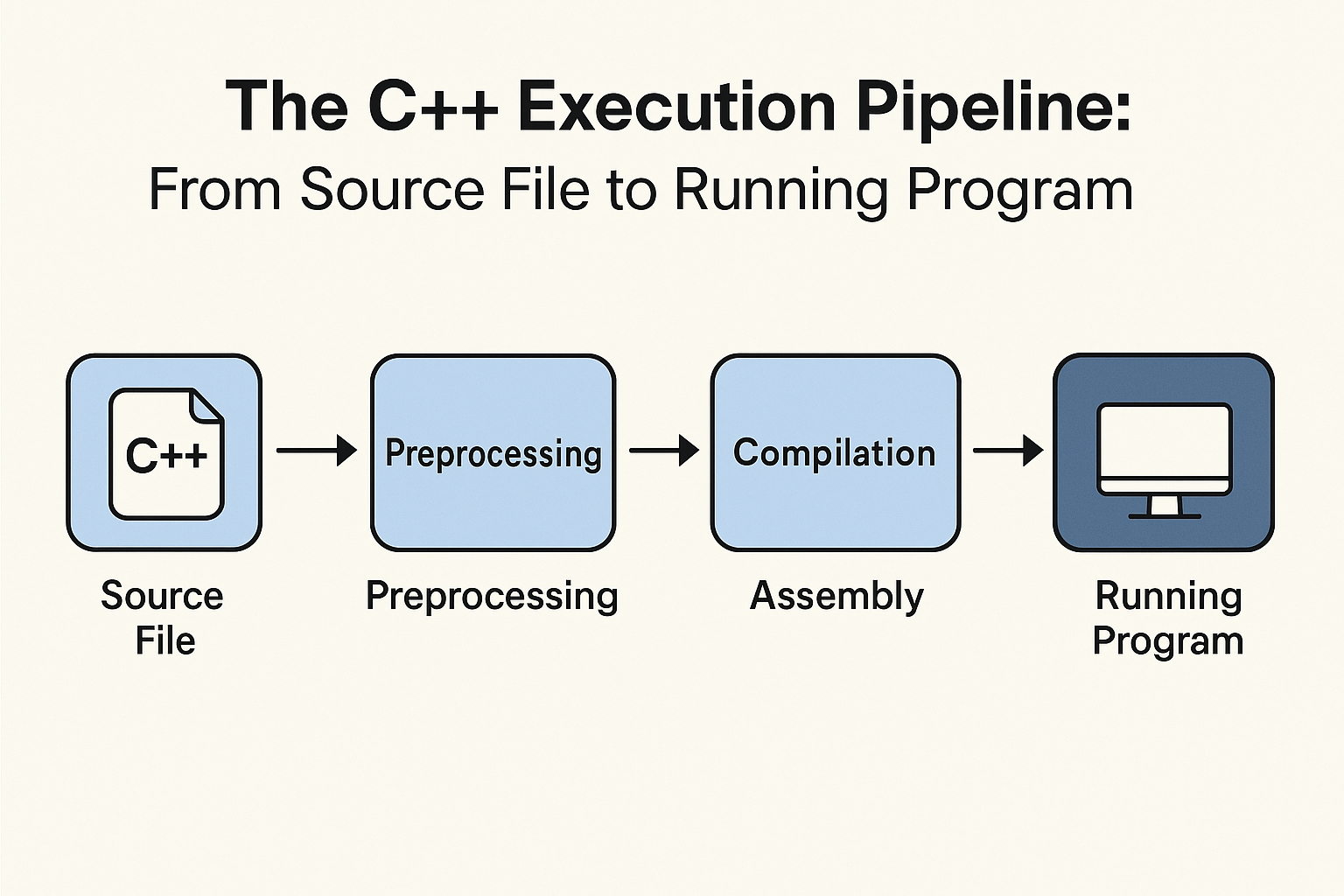
C++ Build Process Cover

How C++ Works: The Journey from Source Code to Execution

C++ is both a powerful compiled programming language and also often used in building systems programming, game development, and other high-performance applications. Unlike interpreted languages, where the code is run by the interpreter one line at a time at run-time, C++ is a compiled language, meaning it executes a few steps prior to running to convert human-readable source code into machine-executable instructions.

The Three Key Stages

A C++ file (often with a .cpp suffix) must go through these three steps:

  1. Preprocessing - Text manipulation and preparation
  2. Compilation - Translation to machine code
  3. Linking - Combining all components into an executable

1. Preprocessing: Preparing C++ Code for Compilation

Before your C++ program reaches the compiler, it goes through a crucial first step called preprocessing. This stage handles special instructions called directives (lines starting with #) and prepares your code for the actual compilation process.

What Does the Preprocessor Do?

The preprocessor performs several key tasks:

I. Including Header Files (#include)

When you write #include <iostream>, the preprocessor finds the file and copies its entire content into your source file.

#include <iostream>  // Replaced with 1000+ lines of declarations

II. Macro Expansion (#define)

#define PI 3.14
#define SQUARE(x) (x * x)  

double area = PI * SQUARE(5);  
// Becomes: double area = 3.14 * (5 * 5);
Caution: Macros don't understand C++ syntax—they just do blind substitution!

III. Conditional Compilation (#ifdef, #ifndef)

Allows including/excluding code based on conditions:

#define DEBUG_MODE  // Comment this to disable debug logs

#ifdef DEBUG_MODE  
    std::cout << "Debug: x = " << x << std::endl;  
#endif

Used heavily for:

IV. Comment Removal

All comments (// and /* */) are stripped out—they don't affect execution.

Real-World Preprocessing Example

Original Code:

#define MAX_USERS 100  
#include <iostream>  

int main() {  
    std::cout << "Max users: " << MAX_USERS << std::endl;
    return 0;  
}

After Preprocessing (Simplified):

/* Hundreds of lines from iostream */  
int main() {  
    std::cout << "Max users: " << 100 << std::endl;  
    return 0;  
}

Why Preprocessing Matters

Common Pitfalls

Issue Example Solution
Missing Header cout << "Hi"; (no #include) Add #include <iostream>
Macro Side Effects #define SQUARE(x) x*xSQUARE(1+1) becomes 1+1*1+1 Use parentheses: #define SQUARE(x) ((x)*(x))
Circular Includes a.h includes b.h, which includes a.h Use #pragma once or include guards

2. Compilation: Translating C++ Code into Machine Instructions

The compilation stage is where your C++ code gets transformed into machine-readable instructions. This process involves multiple steps that ensure your program is syntactically correct, logically sound, and optimized for execution.

What Happens During Compilation?

The compiler processes your preprocessed C++ code (a translation unit) and converts it into object code—binary instructions that the CPU can execute. However, this code isn't yet a complete program; it may still reference external functions (like std::cout) that need to be resolved later by the linker.

Key Stages of Compilation

  1. Lexical Analysis
    The compiler breaks the code into tokens—small meaningful units like:
    • Keywords (int, return)
    • Identifiers (main, sum)
    • Literals (5, "hello")
    • Operators (+, <<, =)
  2. Syntax Analysis (Parsing)
    The compiler checks if the tokens form valid C++ structures (e.g., correct if statements, loops, function definitions).
  3. Semantic Analysis
    The compiler verifies logical correctness, such as:
    • Type checking (e.g., can't assign a string to an int)
    • Variable declaration (e.g., using x without declaring it first)
    • Function call validity (e.g., calling sqrt("abc") is invalid)
  4. Code Generation
    The compiler converts the parsed code into machine code (or optionally assembly).
  5. Optimization
    The compiler may simplify or rearrange code for better performance (e.g., removing unused variables, precomputing constant expressions).

Example: C++ to Assembly

C++ Code:

#include <iostream>
int main() {
    int a = 5;
    int b = 10;
    int sum = a + b;
    std::cout << sum << std::endl;
    return 0;
}

Simplified Assembly Output (x86-64, GCC):

_main:
    push    rbp           ; Save base pointer
    mov     rbp, rsp      ; Set up stack frame
    mov     DWORD PTR [rbp-4], 5    ; int a = 5
    mov     DWORD PTR [rbp-8], 10   ; int b = 10
    mov     eax, DWORD PTR [rbp-4]  ; Load 'a' into register
    add     eax, DWORD PTR [rbp-8]  ; Add 'b' to 'a'
    mov     DWORD PTR [rbp-12], eax ; Store result in 'sum'
    ; (std::cout << sum << std::endl would appear here)
    mov     eax, 0        ; return 0;
    pop     rbp
    ret
Note: Real-world assembly is more complex due to optimizations and system calls.

Memory Allocation: Compile-Time vs. Runtime

Memory can be allocated in two ways:

1. Compile-Time Allocation

The compiler reserves memory for:

Example:

int arr[10];  // Stack-allocated at compile time

2. Runtime (Dynamic) Allocation

Memory is allocated during program execution using new, malloc, etc.

Example:

int* ptr = new int[10];  // Heap-allocated at runtime
Danger: Forgetting delete[] ptr; causes memory leaks, but the compiler won't catch this—it's a runtime issue.

Common Compile-Time Errors

Error Type Example Fix
Syntax Error int main( { ... } Add missing )
Undeclared Variable y = 5; Declare int y; first
Type Mismatch int x = "hello"; Use std::string instead
Invalid Function Call print(10); Include correct header
Important: If compilation fails, the program won't proceed to linking.

3. Linking: The Final Step to Creating an Executable Program

After successful compilation, your C++ program goes through one last critical stage called linking. This is where all the pieces come together to form a complete, runnable program.

What Does the Linker Do?

The linker performs several crucial tasks to prepare your program for execution:

  1. Combining Object Files - Merges all .o or .obj files into a single executable
  2. Resolving External References - Finds implementations for all used functions
  3. Memory Organization - Determines where code and data will reside in memory
  4. Handling Static Initialization - Arranges initialization of global/static objects

Linking: A Simple Example

main.cpp:

#include <iostream>
extern void helper(); // Declaration

int main() {
    std::cout << "Starting program\n";
    helper();
    return 0;
}

helper.cpp:

#include <iostream>

void helper() {
    std::cout << "Helper function called\n";
}

The linking process:

  1. Compiler creates main.o and helper.o
  2. Linker combines them with standard libraries
  3. Resolves that helper() in main.o points to the function in helper.o
  4. Creates final executable

Types of Linking

Static Linking

Command (GCC):

g++ main.o helper.o -static -o program

Dynamic Linking

Command:

g++ main.o helper.o -o program

Common Linker Errors

Error Example Solution
Undefined Reference
main.o: In function `main':
main.cpp:(.text+0x15): undefined reference to `helper()'
Add missing file to link command
Multiple Definitions
helper.o:helper.cpp:(.text+0x0): multiple definition of `helper()'
Use inline or proper header guards
Missing Library
cannot find -lboost_system
Install library or correct path

Viewing Linking Details

To examine linking process:

Show linker commands (GCC):

g++ -v main.cpp helper.cpp

View shared library dependencies:

ldd program  # Linux
otool -L program  # macOS

The Complete Journey of a C++ Program: From Source to Execution

Let's follow the entire lifecycle of a simple C++ program to understand how it transforms from human-readable code to an executable application.

Our Example Program

#include <iostream>

int main() {
    std::cout << "Hello, World!" << std::endl;
    return 0;
}

Stage 1: Preprocessing - The Text Transformation

What happens:

  1. The preprocessor scans for directives starting with #
  2. #include <iostream> is replaced with the entire iostream header content
  3. All comments are removed
  4. Macros (if any) are expanded

Visualization:

// Original
#include <iostream>  // 1 line

// After preprocessing
/* Hundreds of lines from iostream */
namespace std {
    extern ostream cout;  // Declaration
    // ... many more declarations
}
int main() {
    std::cout << "Hello, World!" << std::endl;
    return 0;
}
Key Point: The preprocessor doesn't understand C++ syntax - it just does text manipulation.

Stage 2: Compilation - From C++ to Machine Code

What happens:

  1. The compiler parses the preprocessed code
  2. Checks syntax and semantics
  3. Generates object code (machine instructions)
  4. Creates symbol table for linking

What's in the object file (main.o):

Compiler's View:

main:
    ; Setup stack frame
    push    rbp
    mov     rbp, rsp
    
    ; Prepare arguments for cout
    mov     esi, OFFSET FLAT:.L.str  ; "Hello, World!"
    mov     edi, OFFSET FLAT:std::cout
    
    ; Call operator<< (unresolved)
    call    std::basic_ostream<char>::operator<<
    
    ; More unresolved calls...
    
    ; Return 0
    mov     eax, 0
    pop     rbp
    ret

Stage 3: Linking - The Final Assembly

What happens:

  1. Linker combines our object file with:
    • C++ standard library (libstdc++)
    • Startup code (calls main())
    • System libraries
  2. Resolves all symbol references
  3. Determines memory layout
  4. Creates executable file format

Dynamic Linking Example:

Static Linking Alternative:

Running the Program

When you execute the program:

  1. OS loader reads executable headers
  2. Maps program into memory
  3. Dynamic linker resolves remaining symbols
  4. Calls startup code
  5. Startup code calls main()
  6. Your program runs!

Common Runtime Errors in C++ and How to Handle Them

Even after successful compilation and linking, C++ programs can encounter various runtime errors that cause crashes or unexpected behavior. Unlike compile-time errors, these issues only appear when the program is executing.

1. Segmentation Fault (Access Violation)

What happens: Your program tries to access memory it doesn't have permission to use.

Common causes:

Example:

int* ptr = nullptr;
*ptr = 5;  // Crash! Segmentation fault

Prevention:

2. Memory Leaks

What happens: Your program allocates memory but never frees it, gradually consuming all available memory.

Example:

void leaky() {
    int* arr = new int[100];
    // Forgot to delete[] arr;
}

Prevention:

3. Undefined Behavior

What happens: The code does something the C++ standard doesn't define, leading to unpredictable results.

Common cases:

Example:

int arr[3] = {1, 2, 3};
int val = arr[5];  // Undefined behavior (out of bounds)

Prevention:

4. Exceptions

What happens: An exceptional condition occurs that disrupts normal program flow.

Common exceptions:

Example:

std::vector<int> v;
v.at(10) = 5;  // Throws std::out_of_range

Handling:

5. Infinite Loops

What happens: Your program gets stuck in a loop that never terminates, consuming CPU resources.

Example:

while (true) {
    // Do something forever
}

Prevention:

By understanding these common runtime errors and how to prevent them, you can write more robust and reliable C++ programs. Remember that while compile-time checks catch many issues, runtime errors require careful design, testing, and debugging to resolve.

Practical Demonstration

Let's see this process in action using GCC:

  1. Preprocess only:
    g++ -E hello.cpp -o hello.ii
    (Examine hello.ii to see expanded code)
  2. Compile to assembly:
    g++ -S hello.cpp
    (Produces hello.s - human-readable assembly)
  3. Compile to object file:
    g++ -c hello.cpp
    (Produces hello.o - machine code)
  4. Link and create executable:
    g++ hello.o -o hello
  5. Run it!:
    ./hello
    Hello, World!

Key Takeaways

  1. Preprocessing - Text manipulation before compilation
  2. Compilation - Translation to machine code with unresolved references
  3. Linking - Combines all pieces into executable
  4. Loading - OS prepares program for execution
  5. Execution - Your code finally runs!

Conclusion: The Code to Winning with C++

Creating a running program from a C++ .cpp program feels much like conducting a festival of code, with preprocessing, compilation, and linking all working together in unity and harmony in the process. Through understanding each step in this pipeline, you will be able to write efficient code, identify and troubleshoot build errors, and manage multi-faceted, more significant projects.

Be it a simple, quick-and-dirty script or a complex system with numerous moving parts, understanding the code pipeline to program will empower you to be a C++ powerhouse! The next time your program runs, you will know the code behind it, and how to apply it!